Frequently Asked Questions (FAQ's)
Frequently Asked Questions (FAQ's)
Question 1:
How do we create a .md (Markdown) file, what are its main purposes, and how does it work in detail, especially in real-world development and Agentic AI applications?
Answer:
A Markdown file is just a text file where you write with a few simple symbols, and they turn into nice formatting (headings, bold, lists, links).
Think of it like texting:
You type **hi**→ it shows as hi(bold)


You type # Title → it shows as a big heading
That's it. No buttons, no menus. Just symbols.
Why do people use it
Docs & READMEs — almost every GitHub repo uses
README.mdNotes & knowledge bases — Obsidian, Notion, Logseq all use Markdown
Blog posts & static sites — Hugo, Jekyll, Astro consume
.mdfilesAI/LLM context files — SKILL.md, AGENTS.md, CLAUDE.md instructions for AI agents (you already use these)
Technical writing — easier than HTML, more portable than
.docx
How to create one in VS Code
Open VS Code
Press Ctrl + N (new file)
Press Ctrl + S (save)
Name it: notes.md (the .md part is important)
Start typing
Done. You made a Markdown file.
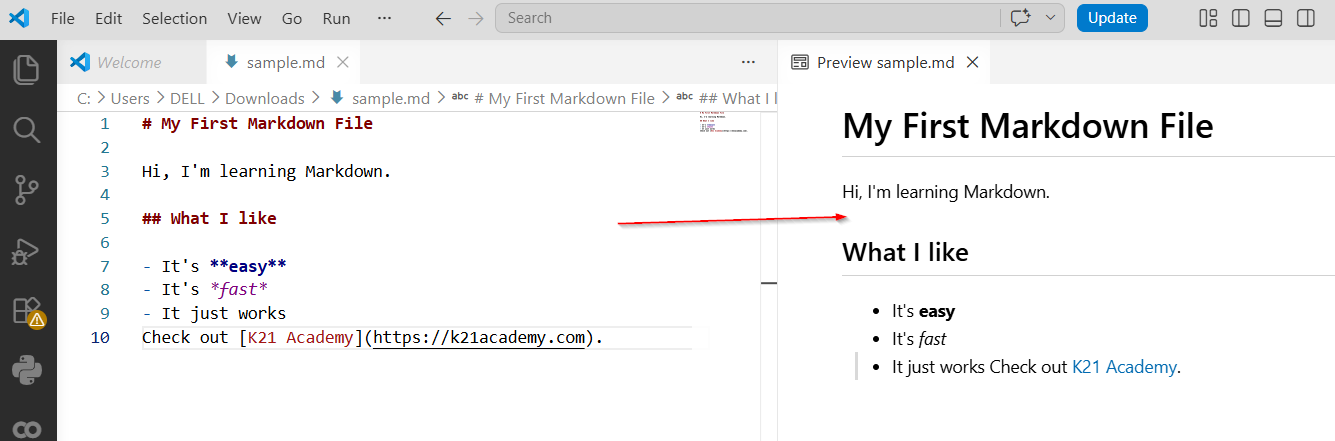
How to see the pretty version
While editing your .md file:
Press Ctrl + K, then V
A preview opens next to your editor
Type on the left → see formatted output on the right
This is the magic moment. Try it once and you'll get it.
The 8 things you'll actually use
1. Headings
Big Heading
Medium Heading
Small Heading
More # = smaller heading.
2. Bold and italic
**bold**


*italic*
3. Lists
- apple
- banana
- mango
Or numbered:
1. First
2. Second
3. Third
4. Links
5. Images

6. Code
For one word: use backticks → code
For a block of code:
your code here
7. Quote
This is a quote.
8. Line separator
---
Three dashes = a horizontal line.
Try it now
Copy this into a .md file:
# My First Markdown File

Hi, I'm learning Markdown.

## What I like

- It's **easy**
- It's *fast*
- It just works
Check out [K21 Academy](https://k21academy.com).
Save it. Press Ctrl + K then V. Watch it become real.