Lab 6: Creating Serper API key
Lab 6: Creating Serper API key
Introduction:
In this lab, we will be Creating the Serper API Key , a powerful tool that allows you to perform real-time Google Search directly within your agents, such as the Planner and Writer.
What is the Serper API?
The Serper API is a service that provides direct access to Google's search results, allowing your agents to retrieve the most relevant and up-to-date information from Google without needing to perform manual searches. It offers a reliable way to access search data, which can then be utilized in your agent workflows.
Why Do We Need the Serper API?
By integrating the Serper API, your agents can:
Perform real-time searches on Google to gather the most current data.
Automatically retrieve search results , enhancing the quality and accuracy of the responses your agents provide.
Save time by automating the search process, allowing your agents to focus on more complex tasks, such as processing and interpreting the retrieved information.
Note: We will use this api key in our Labs
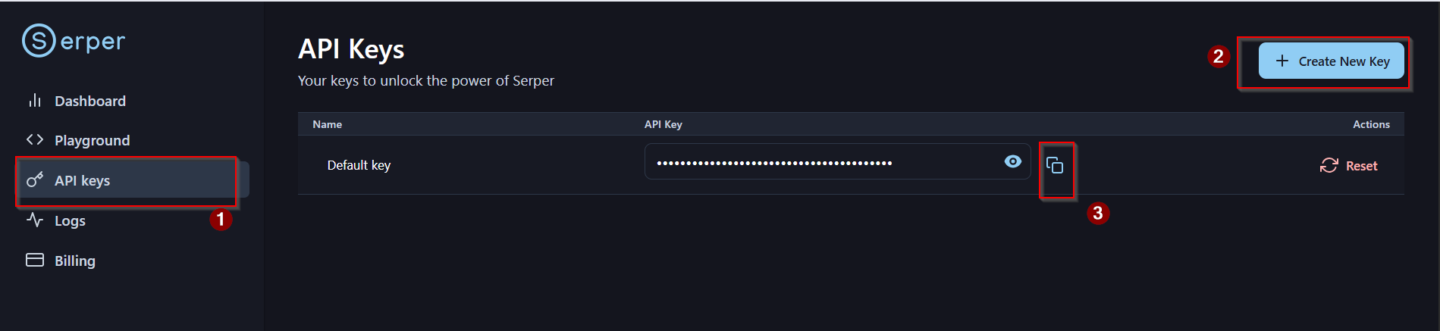
To create your Serper API key, please follow the steps below:
Visit the Serper website: https://serper.dev
Sign up or log in to your Serper account.
Navigate to your dashboard and click Generate API Key.
Copy the generated API key and store it securely.
This Serper API key will allow your agents (Planner & Writer) to perform real-time Google Search during the lab.