n8n vs LangGraph: Detailed Comparison
n8n vs LangGraph: Detailed Comparison
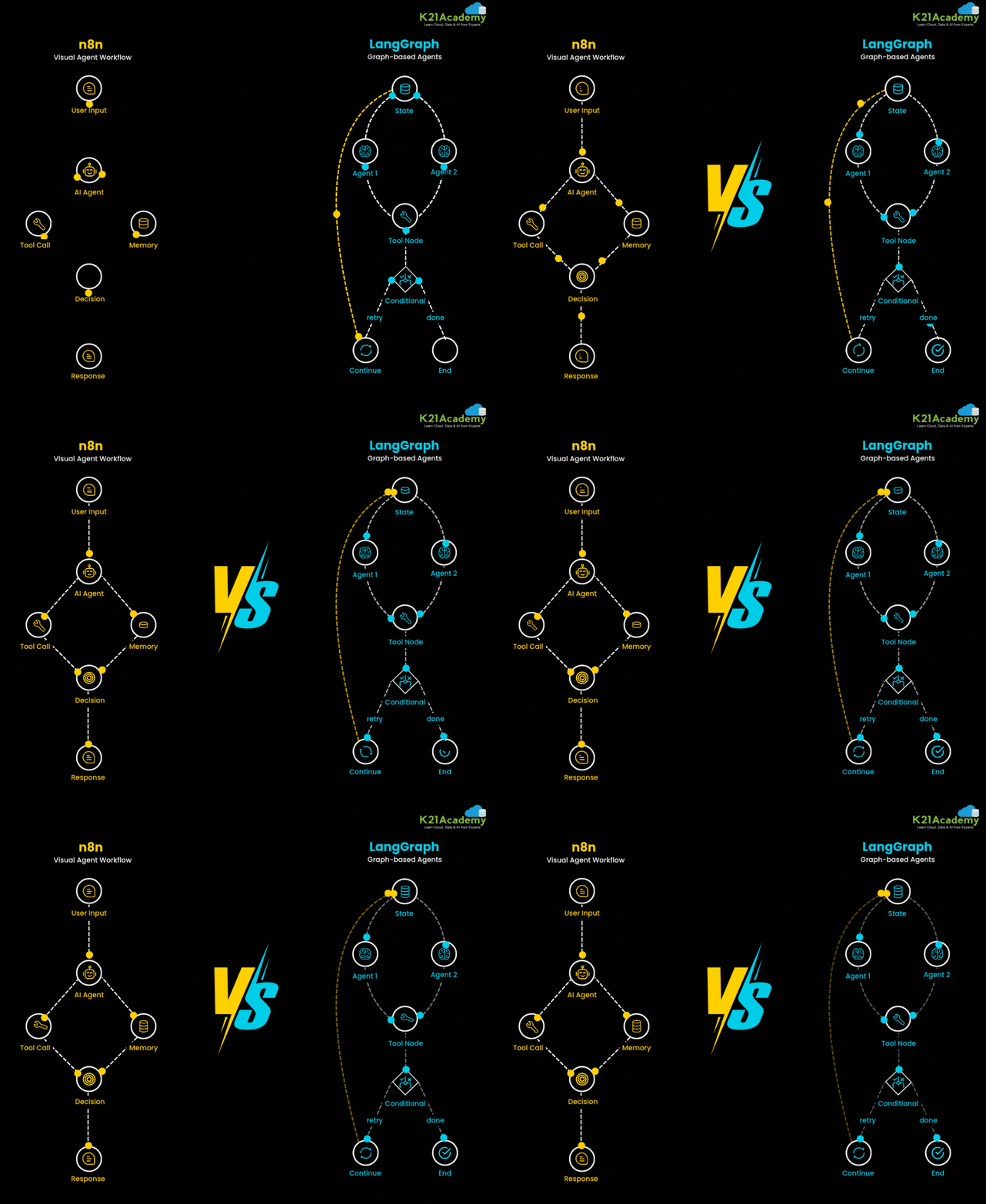
In the evolving world of AI agents and automation, choosing the right workflow tool can significantly impact your system’s efficiency and scalability. This GIF compares two powerful tools: n8n and LangGraph , visualizing how they each handle AI agent workflows.
🔶 n8n – Visual Agent Workflow
n8n (pronounced “n-eight-n”) is an open-source workflow automation tool designed for visual logic building. It's well-suited for tasks involving APIs, tools, and simple agent behavior.
n8n Workflow Steps:
User Input
The process begins with a user interaction — could be text, command, or trigger.AI Agent
The AI agent receives the input and processes it to determine the next steps.Tool Call
If external actions are needed (API call, database query, etc.), the agent triggers a tool call.Memory
The agent stores or retrieves contextual data to maintain continuity and improve future decisions.Decision
Based on processed information, the agent evaluates the next logical step.Response
The workflow ends with a response back to the user or system.
🟡 Key Traits of n8n:
Visual drag-and-drop interface
Good for rule-based and structured flows
Suitable for no-code/low-code automation
Limited in multi-agent, stateful reasoning without extensions
🔷 LangGraph – Graph-based Agents
LangGraph is a graph-based orchestration framework built for AI-native agents , designed to manage complex reasoning paths, retries, and dynamic decision-making through stateful graphs.
LangGraph Workflow Steps:
State
The system initializes with a context/state that carries memory, prior actions, and intent.Agent 1
The first AI agent handles a part of the task (e.g., interpretation or decomposition).Agent 2
A second agent takes over for further reasoning or action planning (e.g., execution, validation).Tool Node
External tools are invoked as needed (APIs, code execution, search, etc.).Conditional
Based on the output, the graph checks whether the process is complete or needs a retry.Retry/Continue or Done
If not resolved, the flow loops back for refinement (retry) or continues the sequence. Otherwise, it ends successfully.
🔵 Key Traits of LangGraph:
Built specifically for agent orchestration
Handles multiple agents with shared state
Ideal for complex decision-making and memory handling
Enables dynamic, non-linear flows with retry and branching
🚀 When to Use What?
Use n8n if you want a no-code , visual way to automate simple workflows like sending emails, triggering APIs, or chaining basic steps.
Use LangGraph if you're building advanced AI agents that require reasoning, retries, memory, and complex decision-making across multiple steps or agents.