Lab 8: Secure API Keys with Google Colab Secrets
Lab 8: Secure API Keys with Google Colab Secrets
14:49
This lab focuses on the critical security practice of Secrets Management. In modern development, you often need to use sensitive credentials (like API keys from OpenAI, Anthropic, or Google) to access external services. Hardcoding these keys directly into your scripts is a major security risk.
1. What are "Secrets"?
Colab Secrets is a built-in feature in Google Colab thatacts as a digital vault. It allows you to store sensitive information (keys, passwords, tokens) separately from your code. These values are stored at the account level, not within the notebook file itself.

2. Why are we doing this?
Prevent Accidental Leaks: If you share your notebook or push it to GitHub, hardcoded keys become public. Anyone with the key can use your credits or access your private data.
Code Portability: You can share the logic of your code without having to "clean" it of personal credentials first.
Security Compliance: It follows the principle of Environment Variables , a standard industry practice for securing software.
3. Lab Setup: Securely Storing the API Keys in Google Colab Secret
3.1 Prerequisiste:
Go to Google Colab or search for "Google Colab" on your browser.
Note : Ensure you are signed in to Google Colab. If you haven't signed in yet, please refer to the following lab: Google Colab - Complete Setup & Usage Guide.Open Google Colab Notebook.
3.2 To add your API keys to Google Colab Secrets, follow these steps:
On the left-hand sidebar, click the Key icon (Secrets).
Click on the Add new secret button.
Name: Enter an environmental variable (e.g., In this case, we are securely storing the OpenAI API key, so use the environmental variableOPENAI_API_KEY).
Value: Paste your actual OpenAI API key here.
Toggle the switch to ON. This grants the current notebook permission to read this specific secret.
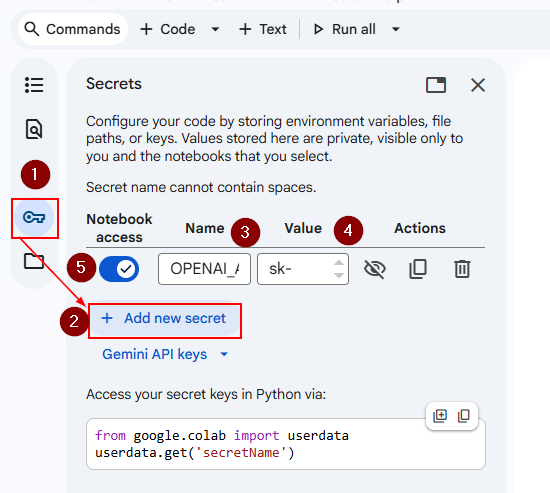
By storing your API key in Colab Secrets, you're keeping it secure and hidden from the notebook code.
Note: We have demonstrated the process of storing the OpenAI API keys in Google Colab. You can add all your API keys (e.g., Gemini, Hugging Face, and Serper) to this notebook, so they can be used in upcoming labs.
3.3 Do we need to repeat the process for every notebook?
No, you do not need to re-enter the secret's name or value for every notebook.
Google Colab Secrets are stored at the account level. Once you add a secret (like OPENAI_API_KEY)it stays in your "vault," it is available to any notebook you open in the future.
3.4 Are the Environment Variable Names Fixed?
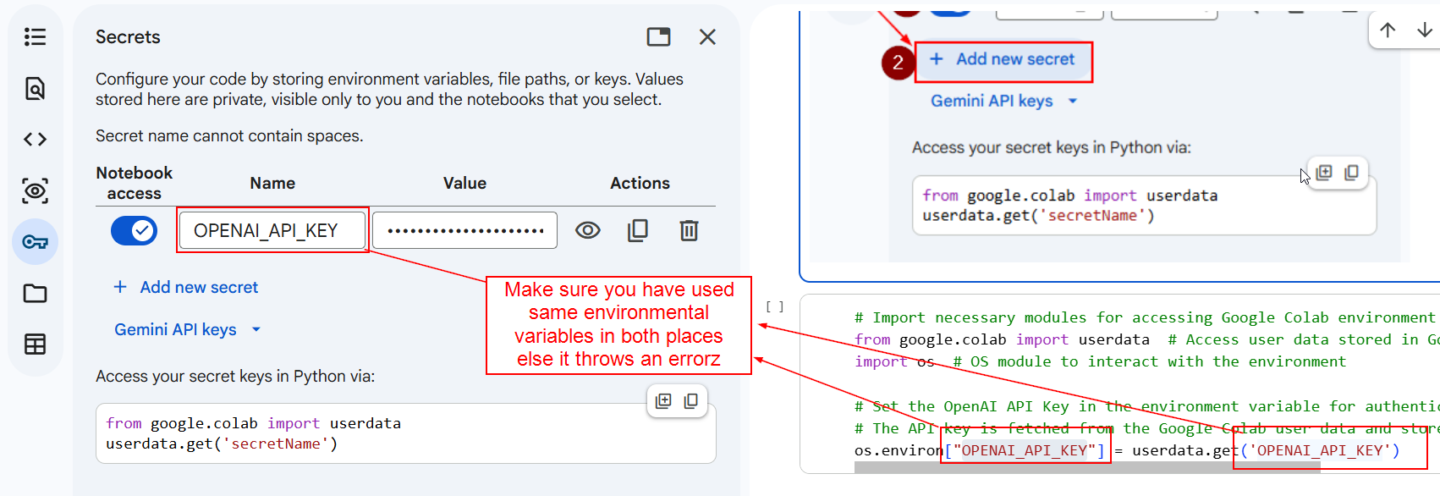
No, environmental variable names are not fixed. You can name them whatever you want, as long as the name you use in the "Secrets" tab matches the name you use in your code.
Conclusion:
By completing this lab, you’ve learned how to securely manage API keys using Google Colab Secrets Manager. This practice ensures that your sensitive information remains safe while providing seamless access to your API keys during runtime. It’s an essential skill for anyone working with cloud-based environments or API integrations.