FAQ's: Claude for Agentic AI (SDLC) Program
FAQ's: Claude for Agentic AI (SDLC) Program
29:47
** 1. Program Access & Onboarding**
Q1. I just joined the program. Where do I start?
A. Bookmark this single URL and remember only this one: k21academy.com/claudeSelf
Everything you need lives here: course modules, prerequisite labs, live session recordings, trainer materials, transcripts, notes, quizzes, and weekly updates.
Then complete the three prerequisite labs (Lab 2.1, 2.2, 2.3) before the next live session so you can follow along hands-on.
Q2. What are the Four essential prerequisite labs?
Ans. These three labs must be completed before Day 1:
• Lab 2.1 — Create & Setup Claude Account
• Lab 2.2 — Setup VS Code
• Lab 2.3 — Install & Setup Git, Node.js, and Claude Code
• Lab 2.4 — Install Chrome Extension for Claude
All three are available on the Skool portal under Module 2 (Setup Environment).
Q3. When are the live sessions held?
Ans. The current Claude AI program live sessions are held every Saturday and Sunday from 10:00 AM to 01:00 PM EDT.
Please refer to this link to convert to your local time: https://www.worldtimebuddy.com/
Q4. What if I miss a live session?
Ans. Don't worry — every live session is recorded.
• A temporary Zoom recording link (valid 48 hours) is shared in the WhatsApp group within 2– 3 hours of the session ending.
• The permanent recording on the Skool portal is uploaded within an SLA of 24 hours.
• Access permanent recordings at: k21academy.com/claudeSelf → [YYMM] - Live Session Recordings. ( YYMM is 2605)
Q5. I can't access the Skool calendar link — it redirects me to the About page. What's wrong?
A. This usually means one of two things:
• You are logged into the free Skool community, not the paid community. Check your email for the invite from noreply@skool.com (subject: "Cloud School by K21 Academy invited you to join their community"), accept it, and complete registration.
• You are not yet logged in. Make sure you are signed in to Skool before clicking any calendar link.
If the problem persists after registration, refresh the page and try again. Still stuck? Email support@k21academy.com with a screenshot.
Q6. Where do I find trainer materials, files, and presentations shared during sessions?
A. Go to k21academy.com/claudeSelf → Live Session Recordings → open the relevant Day → scroll to "Material Shared by the Trainer" → click "Click Here".
A Google Drive link with all weekly materials is also shared in the WhatsApp group. Bookmark it for quick access.
Q7. Some material files are in HTML format and won't open. What do I do?
Ans. Download the HTML file to your local device first, then open it with any browser (Chrome, Edge, Brave, Safari). Don't try to preview HTML directly in Google Drive.
Q8. I have a schedule conflict with the live session. Will I lose progress?
Ans. No. You will get the full recording, trainer materials, transcripts, notes, quizzes, and assignments on the portal.
Go through the recording at your convenience and complete the hands-on labs. For Live Inetractive session, come back for Future sessions.
Reach out at support@k21academy.com if you face any difficulty while reviewing.
** 2. Claude Subscription & Billing**
Q9. Do I need to purchase a Claude subscription before the next class?
Ans. Upgrading to Claude Pro is not strictly mandatory, but it is highly recommended.
Sessions from Day 2 onwards involve tool installations and hands-on application development. Having a Pro account ensures you can follow every practical exercise without limits.
Choose Claude Pro (paid) rather than the free tier.
Q10. What exactly does the $20 Claude Pro subscription cover?
Ans. Your Pro subscription gives you access to:
• Claude AI (Web) — claude.ai
• Claude Desktop App (Cowork)
• Claude Browser Extension (Chrome)
• Claude Code (CLI) — when logged in with your Pro account
• Claude IDE plugins (VS Code, JetBrains) — when logged in with your Pro account
Q11. Is the Anthropic API the same as Claude Pro?
Ans. No — they are billed separately.
• Claude Pro ($20/month) covers all user-facing interfaces and CLI/IDE access when logged in with your Pro account.
• Anthropic API is pay-as-you-go and billed on token consumption. It is used when you call Claude programmatically from your own scripts, LangChain, RAG pipelines, automation, etc.
Lesson: Pro alone is enough for Claude Code labs. You only need API credits when the lab specifically asks you to call the API from custom code.
Q12. How much should I add to my Anthropic API account for the course labs?
Ans. For the scope of our course labs, adding $5 is usually more than enough. Monitor your usage at console.anthropic.com → Billing → Usage.
Q13. How do I check my Anthropic API usage and billing?
Ans. Log in to console.anthropic.com
• Go to Billing → Usage
• Pay special attention to the "Extra usages" toggle — keeping it ON means you may get charged extra if you exceed your prepaid credits.
Check usage at the end of each lab or each day so charges don't accumulate without your knowledge.
Q14. I have ANTHROPIC_API_KEY set on my system. Will Claude Code still use my Pro subscription?
Ans. No — and this is a common gotcha.
If ANTHROPIC_API_KEY is set as an environment variable, Claude Code automatically switches to API-based pay-as-you-go billing instead of your Pro plan.
If you want Claude Code to use your Pro subscription, unset the API key:
  # macOS/Linux
  unset ANTHROPIC_API_KEY
  # Windows PowerShell
  Remove-Item Env:ANTHROPIC_API_KEY
Q15. Do my Claude custom instructions (global preferences) count toward token usage?
Ans. Yes. Custom instructions are silently attached as system instructions to the start of every conversation, so they do consume tokens. The impact is minimal because instructions are short and Claude uses prompt caching to avoid reprocessing them each time.
** 3. VS Code Installation & Setup**
Q16. What is VS Code and why do I need it?
Ans. Visual Studio Code is a free code editor from Microsoft. It is the IDE we use throughout the program to write code, run Claude Code from the integrated terminal, and use the Claude IDE extension. Download from code.visualstudio.com.
Q17. Which VS Code extensions should I install?
Ans. At minimum, install these:
• Claude (Anthropic's official Claude extension for inline assistance)
• Python (if you'll write Python code)
• GitLens (helpful for Git history and blame)
Lab 2.2 walks you through the exact extensions needed.
Q18. Where do I run commands — Command Prompt, PowerShell, or VS Code terminal?
Ans. You can use any of these on Windows:
• VS Code Integrated Terminal (recommended — keeps you in one place)
• PowerShell
• Command Prompt (cmd)
• Git Bash (if installed)
If a command fails in one terminal (for example, npm in PowerShell), try the same command in cmd or VS Code terminal. Sometimes PATH variables behave differently across shells.
** 4. Git, GitHub & Git Bash**
Q19. What is Git, and what is Git Bash?
Ans. Git is the version control system we use to track code changes.
Git Bash is a Bash-like terminal that ships with Git for Windows. It gives you Linux-style commands on Windows and is useful for running shell commands consistently.
Download both together from git-scm.com.
Q20. Can I use WSL (Windows Subsystem for Linux) for the labs?
Ans. Yes. Many developers prefer WSL for a smoother Linux-based workflow on Windows.
Install Git on Linux inside WSL and proceed normally. Future labs should work fine in this setup.
Q21. I have created a GitHub account but I'm not sure how to set up SSH/PAT for pushing.
Ans. For the prerequisite labs, simply having a GitHub account is enough — we'll cover authentication when we start pushing code in later sessions.
When you do need to push, GitHub now requires either a Personal Access Token (PAT) or SSH keys instead of a password. We'll walk through PAT setup live in class.
** 5. Node.js Installation**
Q22. Do I really need to install Node.js for this program?
Ans. Yes. Two reasons:
• Claude Code is distributed as an npm package (@anthropic-ai/claude-code), so you need Node.js and npm to install it.
• Later sessions will use Node.js for CI/CD automations and running Claude Code from inside the VS Code terminal.
Q23. How do I verify Node.js installed correctly?
Ans. Open a new terminal (cmd, PowerShell, or VS Code terminal) and run:
node --version
npm --version
Both should return version numbers. If you get "not recognised", see Q on npm errors below.
** 6. Claude Code (CLI) Installation**
Q24. What command installs Claude Code?
Ans. Run this in your terminal (after Node.js is installed):
npm install -g @anthropic-ai/claude-code Then start it from any project folder by typing:
claude To know more about the installation process, please refer to Section 8 of this lab guide: Click Here

Q25. I get this error: "npm: The term 'npm' is not recognized as the name of a cmdlet…". How do I fix it?
Ans. This means Node.js/npm isn't on your system PATH yet. Try these steps in order:
• Close your current terminal completely and open a fresh one (PATH is read at terminal launch).
• Try a different terminal — if PowerShell fails, try cmd or the VS Code terminal.
• If still failing, reinstall Node.js from nodejs.org and during install make sure the option "Add to PATH" is checked.
• On Windows, restart your machine after install if the issue persists — PATH changes don't always propagate to running shells.
Q26. Should I log in to Claude Code with my Pro account or use an API key?
Ans. Claude Code supports both. Choose based on your usage:
• Pro/Max subscription login — flat $20/month, recommended for the labs and regular use. No surprise bills.
• Anthropic API key — pay-as-you-go, billed per token. Good if your usage is occasional or you want fine-grained cost visibility.
Recommendation: start with Pro login. If you experiment with the API key later, monitor billing daily.
Q27. How do I check which billing mode my Claude Code is using?
Ans. Run these commands in your terminal:
claude config
echo $ANTHROPIC_BASE_URL
echo $ANTHROPIC_API_KEY
On Windows PowerShell, use $env:ANTHROPIC_API_KEY instead.
If ANTHROPIC_API_KEY is set, Claude Code is using API billing. If it's empty and you logged in via /login in claude, it's using your Pro subscription.
Q28. Lab 2.3 Section 9 asks for an API key — do I need to actually buy credits to finish it?
Ans. No, not for Section 9 specifically.
Section 9's goal is to teach you secure secret management using .env and .gitignore files. You can complete the workflow with a dummy key like sk-ant-12345.
You only need a funded API key later when you actually call the Anthropic API from your code.
Q29. What is Claude Cowork?
Ans. Claude Cowork is Anthropic's desktop tool for non-developers to automate file and task management on their computer. It's part of the Claude Desktop App experience and lets Claude work alongside you on local files.
Q30. Is Claude Cowork included in my Pro subscription?
Ans. Yes. Your $20 Claude Pro plan covers the Desktop App / Cowork along with Claude AI Web and the Browser Extension.
Q31. What's the difference between Claude Code and Claude Cowork?
Ans. Both are Claude in your local environment, but they target different users:
• Claude Code is a command-line tool for developers — agentic coding from the terminal, deep IDE integration.
• Claude Cowork is a desktop app for non-developers — automating files, tasks, and workflows without writing code.
You can use both with the same Pro account.
For more details, please refer to this link: Click Here
Q32. What are Claude Artifacts?
Ans. Artifacts are standalone outputs Claude creates inside a conversation — interactive React components, HTML pages, SVG diagrams, documents, code files — that you can preview, edit, and share directly from claude.ai.
Think of them as a separate workspace next to the chat where Claude's longer outputs live so you can iterate on them.
A step-by-step video and guide on creating Artifacts (as demonstrated in Day 2) will be shared on the portal under Day 1/2 notes.
Q33. What are Claude Skills?
Ans. Skills are reusable folders of best practices and instructions that customise how Claude approaches certain tasks (for example, generating a docx, creating slides, or following a specific writing style).
Skills will be covered in future sessions — there's nothing you need to download or set up now.
Q34. Can I run Claude models on my local PC (with my own GPU) to avoid API costs?
Ans. No — Anthropic's Claude models (Opus, Sonnet, Haiku) are closed-source and cloud-only. They cannot be downloaded or run on your local machine.
If you've "installed Claude locally" via Ollama or LM Studio, you are running an open-source model (Llama, Qwen, Mistral, etc.) — not Claude.
For our course labs that specifically use Claude Code, an active Pro subscription or Anthropic API key is required.
** 10. Common Errors & Troubleshooting**
Q35. "npm: The term 'npm' is not recognized…" — how do I fix it?
Ans. Node.js/npm is not on your system PATH. Steps:
• Close all terminals and open a new one.
• Try a different shell (cmd or VS Code terminal instead of PowerShell).
• If still failing, reinstall Node.js from nodejs.org with the "Add to PATH" option checked.
• Restart your computer if needed.
Q36. Where should I post lab-specific errors so I get the fastest help?
Ans. For lab issues, post them in the dedicated troubleshooting thread for that lab guide on Skool. Always include:
• A clear screenshot of the error
• The exact step where the issue occurred
• Your OS (Windows / macOS / Linux)
This helps the team troubleshoot quickly and benefits other learners who hit the same problem.
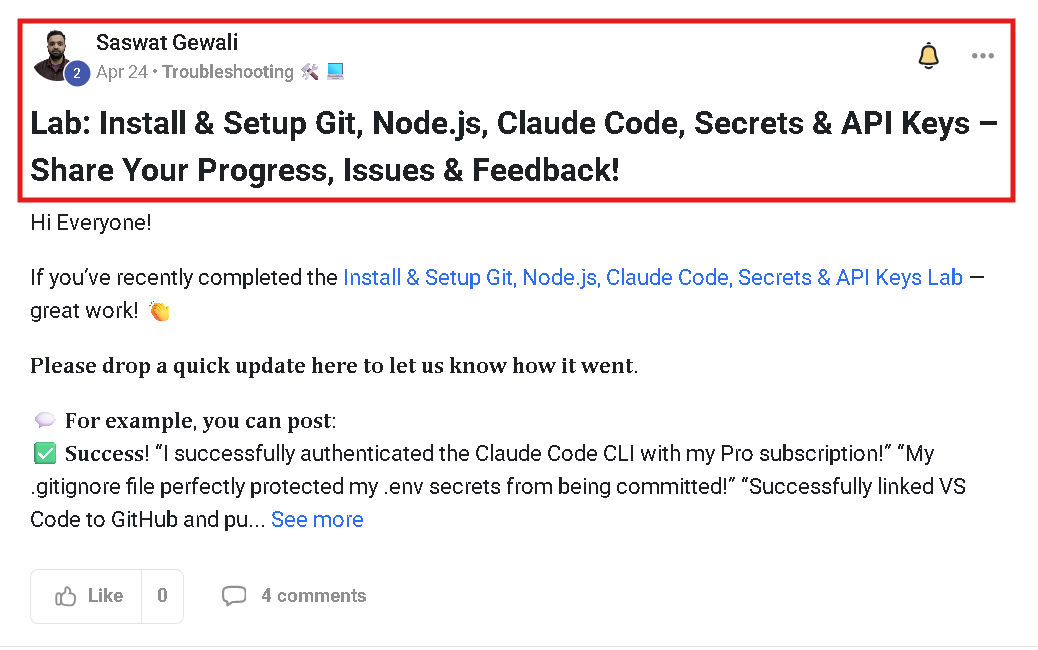
Here is an example of the troubleshooting thread located at the bottom of each lab:
** Need Further Help?**
If your question isn't covered in this FAQ, here's how to reach us — in order of fastest response:
Post in the dedicated troubleshooting thread of the relevant lab on Skool.
Post in the WhatsApp group with a clear screenshot and the exact step where you are stuck.
Email support@k21academy.com for one-to-one assistance.
Quick links:
• Course home: k21academy.com/claudeself
• Anthropic Console (billing): console.anthropic.com
• Node.js download: nodejs.org
• VS Code download: code.visualstudio.com
• Git download: git-scm.com